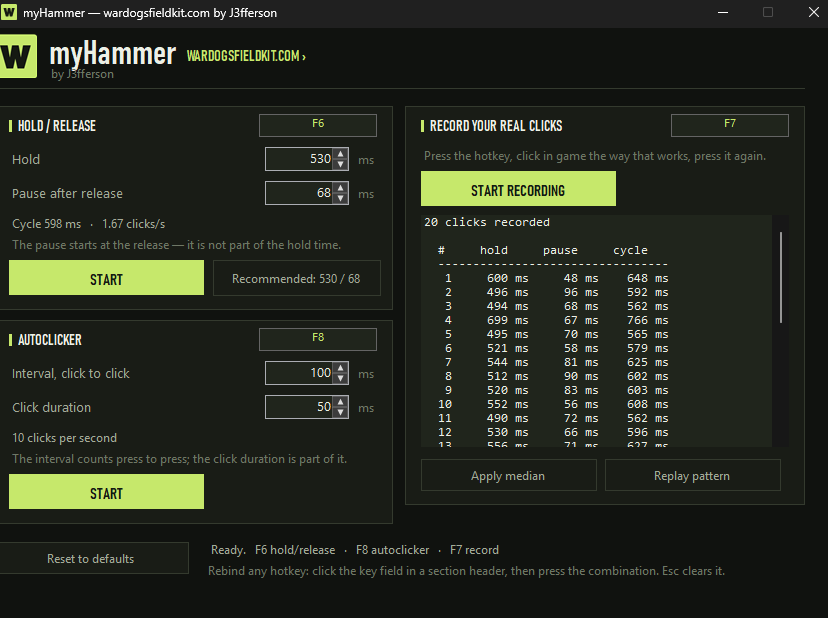
Your building aid for WARDOGS: myHammer automates hammer animation cancelling with an adjustable hold/release rhythm. Team full? The team-join autoclicker keeps clicking the join button for you while you wait for a slot.
Windows 10 / 11 · x64No installationCustomizable hotkeys
*Includes a preset starting value of 1,231. Each completed file transfer adds one; repeat downloads count too.
01 / BUILD
Build with automatic animation cancelling
Let myHammer handle the repeated hold/release inputs for hammer animation cancelling, so you can focus on building instead of timing every click. Adjust hold and pause separately. Actual building speed depends on your settings and the game.
02 / JOIN
Team full? Let the autoclicker try.
Point at the team join button and let the autoclicker repeat clicks while you wait. Set the click interval and duration, with a clicks-per-second display. A free slot is not guaranteed.
03 / RECORD
Fine-tune your building rhythm
Record your clicks and inspect hold, pause and cycle times, including minimum, median, average and maximum. Apply the values or replay the recorded sequence in a loop.
READY WHEN YOU ARE
Set it up. Get building.
All hotkeys are freely customizable and work globally, including while the game is in the foreground. F6 (Hold / Release), F8 (Autoclicker) and F7 (recording) are just the defaults. Click the hotkey field in a section header, then press your preferred key or combination, optionally with Ctrl, Shift or Alt. Esc clears the assignment. Live measurements show the timings actually achieved.
Download the EXE and open it on Windows 10 or 11 (64-bit). No separate .NET installation needed.
Choose Hold / Release or Autoclicker and set the timings. Start with 530 / 68 ms for the hammer, then adjust.
Check your hotkey assignments, start the selected mode and stop it with the assigned hotkey when finished.
Before you start
This file is not digitally signed. Windows SmartScreen may show a warning. Check the source and file before deciding whether to run it. Mouse hooks and simulated clicks can also trigger antivirus detections; a detection is not automatically a false positive.
An independent community tool. Approval by the WARDOGS developers or anti-cheat compatibility has not been verified. Check the current game and server rules before using click automation.